How to Track Tariff Impact During PCB Component Selection
Tariffs can increase component cost, reduce sourcing flexibility, and create downstream BOM risk if they are not evaluated during component selection. A component that meets electrical requirements may still create manufacturing and procurement problems if tariff exposure, country of origin, and supplier availability are not understood before it enters the design.
OrCAD X CIP and the CIP Compliance Module help engineers analyze tariff and sourcing data directly inside the component database. By reviewing tariff indicators alongside lifecycle, availability, and compliance information, teams can make more resilient part decisions earlier and reduce the risk of cost-driven redesigns later.
Why Tariff Data Matters in PCB Design
Tariffs are more than a purchasing concern. They can affect the landed cost of a component, change which distributors are economically viable, and increase the likelihood that a preferred part becomes a schedule risk. If tariff impact is not reviewed until after procurement receives the BOM, engineering may already be locked into a part choice that is difficult or expensive to change.
This is why tariff visibility should be treated as part of a broader supply chain intelligence workflow. Engineers should understand not only whether a component is electrically valid, but also whether it can be sourced cost-effectively and sustainably throughout the product lifecycle.
Tariff-Related Data to Review During Part Selection
When selecting components, the following tariff-related data should be analyzed:
- US/China Tariff Impact
- HTSUSA classification
- Country of origin
Together, these fields help quantify the probability that a component will be affected by tariffs, identify how it is classified for import purposes, and show where the part was produced. That information is critical when comparing components that are electrically similar but carry different sourcing and cost exposure.
Why Tariff Data Should Live in the Database
Tariff analysis is most useful when it is stored alongside approved part data rather than tracked in disconnected spreadsheets or ad hoc procurement notes. Embedding supply chain data in the library makes the information reusable during future searches, NPI reviews, and BOM decisions.
A centralized component library also improves consistency across teams by ensuring tariff risk, sourcing visibility, and approved part intelligence are evaluated in the same location as design data.
How to Configure a Tariff Search in OrCAD X CIP

OrCAD X CIP provides an efficient way to surface tariff exposure directly during database searches. The workflow below creates a reusable tariff-focused search that can be shared across the team.
1. With OrCAD X Capture open, select CIP > Open CIP from the menu and log in if prompted.
2. Open the CIS DB Search window. If the window is not visible, select CIS DB Search.
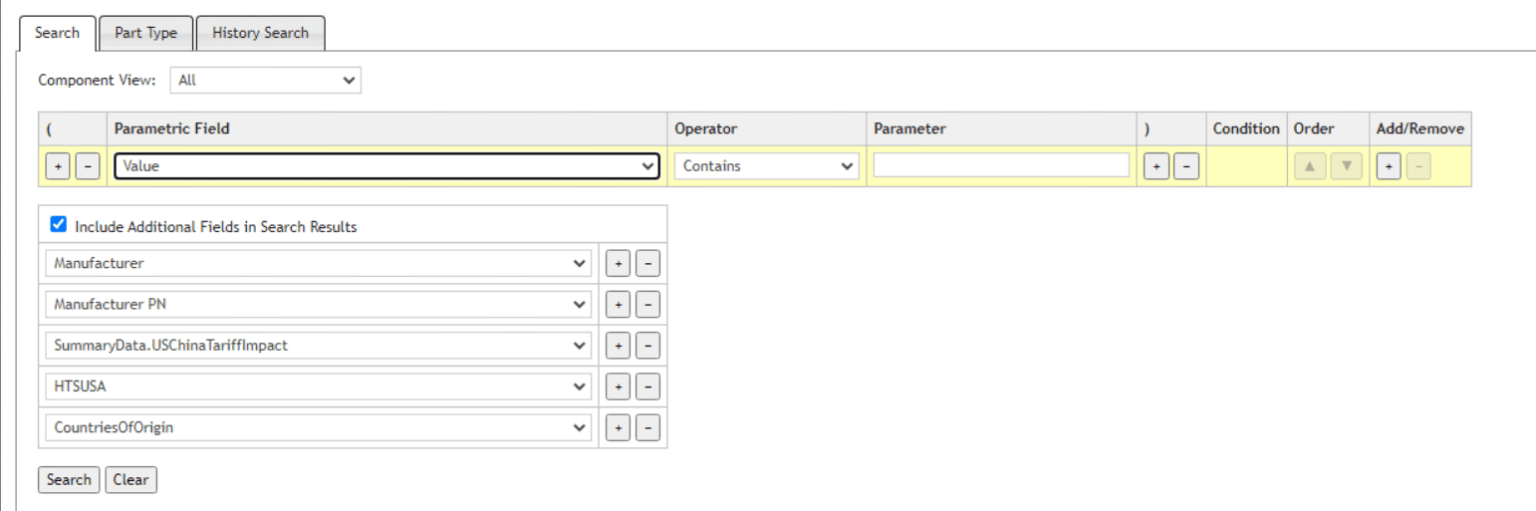
3. Under Parametric Field select the dropdown currently displayed as PART_NUMBER and select Value.
4. Select the check box to Include Additional Fields in Search Results.
5. Select the drop-down for the additional field and select Manufacturer.
Track Tariffs During Part Selection with CIP Compliance Module
6. Select the + to add another additional field to the search criteria.
7. Select the drop-down for the additional field and select Manufacturer PN then select the + to add another field to the search criteria.
8. Select the drop-down for the additional field and select SummaryData.USChinaTariffImpact then select the + to add another field to the search criteria.
Note: The US/China Tariff Impact field will display the probability that the component will be affected by tariffs. This result will be displayed as Not Likely Impacted, Less Likely Impacted, Probably Impacted, Impacted Now, etc.
9. Select the drop-down for the additional field and select HTSUSA then select the + to add another field to the search criteria.
Note: HTSUSA refers to the Harmonized Tariff Schedule of the United States. The Harmonized Tariff Schedule sets out the tariff rates and statistical categories for all merchandise imported into the United States. The HTS is based on the international Harmonized System, which is the global system of nomenclature applied to most world trade in goods.
10. Select the drop-down for the additional field and select CountriesofOrigin.
Note: The Countries of Origin displays where the component is produced and identifies which country carried out the last significant manufacturing process.
How to Use the Saved Search During Part Selection
After the search is configured, engineers can apply it during routine database lookups to compare tariff exposure across candidate parts.
Save and Reuse Searches to Track Tariffs
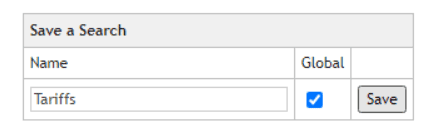
11. Under Save a Search, name the search Tariffs.
12. Select the checkbox for Global. This will make the saved search available for all team members within CIP.
13. Select Save. The search has been saved successfully. Close out of the window.
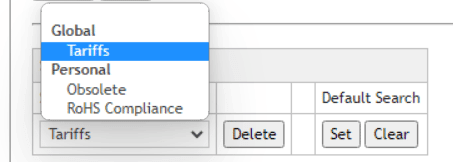
The saved search is now visible in the Select a Search section and can be used when performing future database searches.
14. In the Parameter field, enter 0.1uF to search for capacitors in your component database that have a value of 0.1uF or equivalent.
14. Select Search.
Review Critical Tariff Information During Part Selection in OrCAD CIP
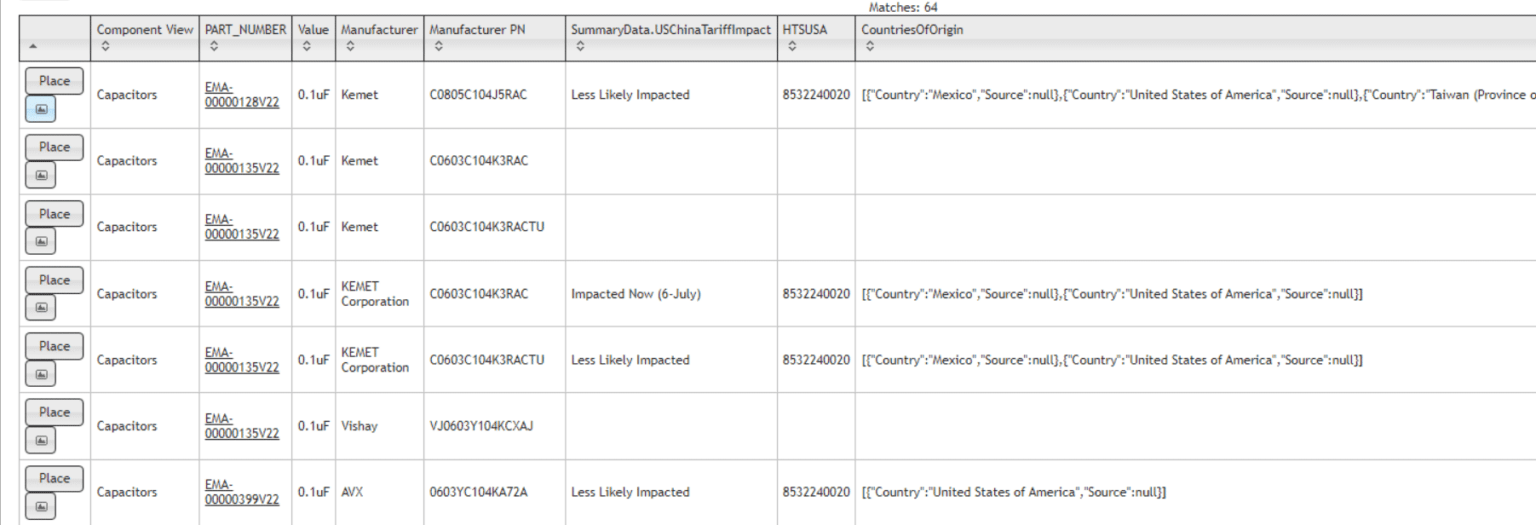
16. Scroll down to view the search results. The returned results include the type of component, the part number, the additional fields defined, the ability to preview the schematic symbol, and the ability to place the symbol in the schematic. This provides a high-level overview of critical parameters during part selection to ensure components selected are minimally affected by tariffs.
17. Select a part number to view more information about the component.
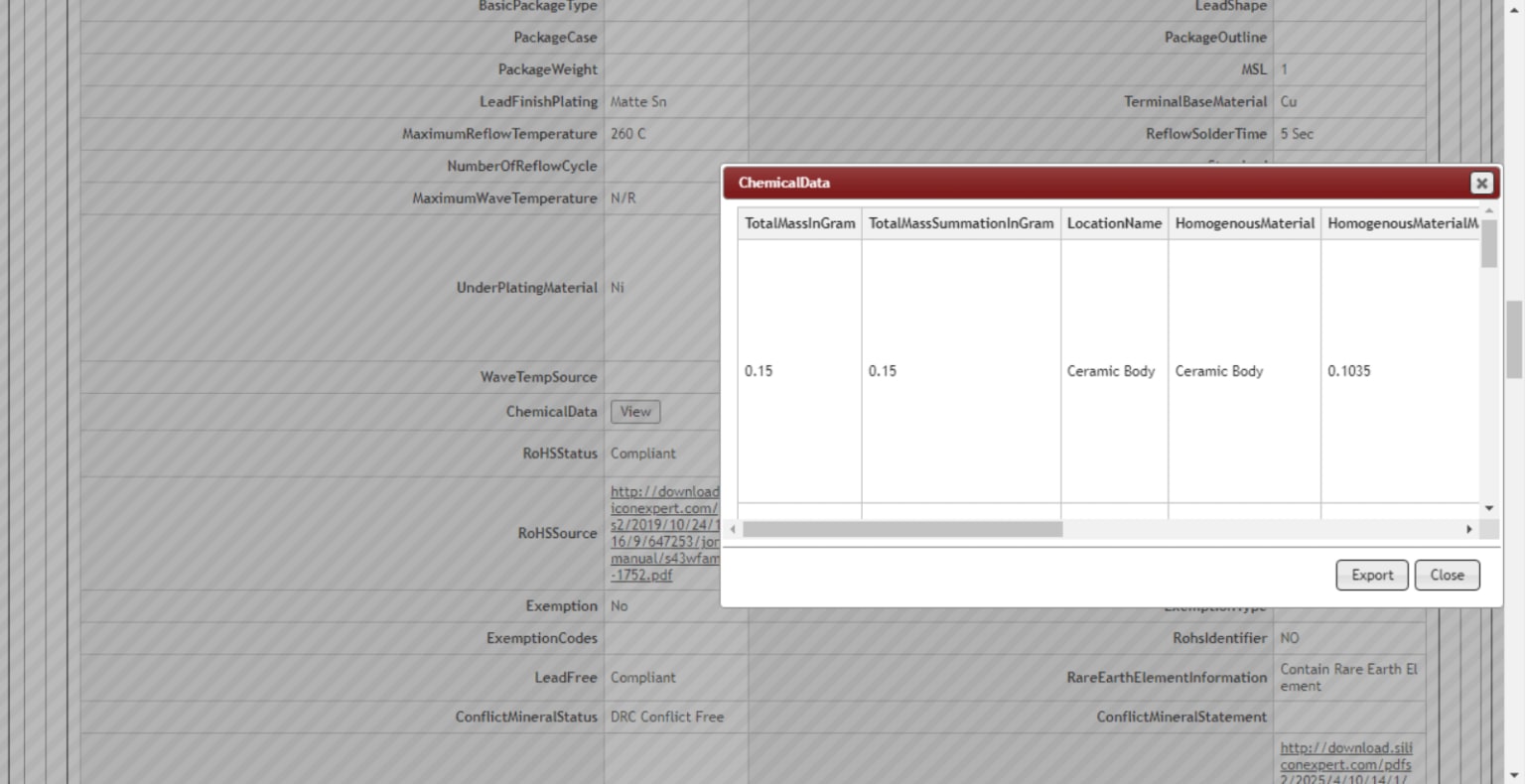
18. Scroll down to review additional supply chain information from SiliconExpert data in CIP. Under ChemicalData, select View to review the Materials Declaration.
19. Close the Materials Declaration.
20. Under CrossData, select View.
21. View the alternate components. Here you can view the cross grade, similarities, and differences.
22. Close the Crosses.
What This Workflow Enables
Reviewing tariff impact during part selection helps engineers identify lower-risk sourcing options before those choices become locked into the BOM. It also improves collaboration with procurement by surfacing cost and origin data earlier, when alternates can still be evaluated without disrupting the design.
Used consistently, this workflow strengthens PCB supply chain management by reducing avoidable surprises in purchasing, supporting more resilient part qualification, and improving production continuity.
Wrap-Up
Tracking tariff impact inside the component database gives engineering teams better visibility into cost and sourcing risk before procurement receives the BOM. By evaluating tariff exposure together with lifecycle, availability, and compliance data, teams can make more informed component decisions and reduce the chance of redesigns caused by supply chain disruption.